TL;DR
A website redesign brings in more leads when it changes your positioning: what you say and who you say it to. New visuals on their own leave the numbers where they were. Because B2B buyers now fill their shortlist before they ever speak to sales, your site does the qualifying while that redesign ticket stays parked in the backlog. This guide walks through the signals that it’s time, a 7-step process, the UX work that drives conversions, real cost ranges, and how to keep the rankings you've already earned.
“Make it look modern” is how most redesign briefs open. That brief buys you a head-turning site and the same conversion numbers three months later—because the visitors who left before still leave, now past a fresher-looking site. Same leak, new paint.
That outcome comes from a mismatch between the problem and the fix. A refresh updates what's already working: new visuals, tighter copy, a few pages brought up to date, on a site whose message still lands. A redesign rebuilds the site around a different answer to “who is this for, and why you.” Both are worth paying for—with different expectations attached.
As a brand transformation agency, Qream draws this line for every client: when a redesign shifts positioning, it moves the pipeline. When a refresh updates only the surface, it delivers aesthetic value—meaningful, but a different kind of result.
What a redesign actually fixes—and what it doesn’t
A few redesign problems are easy to spot because they show up in your numbers. Bounce rates, drop-off points, mobile conversion—the data points at them directly. This is what falls into that category:
- A design that intuitively signals it hasn't been updated in a long time.
- Forms that break on mobile.
- Navigation that costs three clicks too many.
- Pages slow enough to lose people before they reach your offer.
Website production handles all four, but why the site says the wrong thing to the right people takes a different kind of work entirely.
Positioning problems, though, survive the prettiest rebuild. When your site promises “innovative” and “customer-focused” while your buyer needs to hear “cut deployment time in half for enterprise IT teams,” a new template just relights the same missed connection. Repositioning flips the script instead: it changes what you say, and who you say it to—which is exactly why repositioning is the harder question, and the one worth asking first.
The stakes also sit earlier in the funnel than most teams assume. According to 6sense’s 2025 B2B Buyer Experience Report, buyers fill four of their five shortlist spots on day one of the journey and then buy from that shortlist 95% of the time. So your site does its most important work months before anyone fills in a form.
That’s why it pays to decide how deep you’re willing to go before anyone opens a design tool—surface-level or structural—and to be honest about what kind of impact on conversions each depth actually delivers.
Signs you need a website redesign (not just a refresh)
Four signals show up again and again before a site stops pulling its weight.
01. Your design predates your current product or pricing
Positioning drifts faster than websites get updated. So when the site still sells what you offered two years ago, every visitor ends up evaluating an outdated version of your company.
02. Sales answers the same question on every call
Every repeated question marks a gap the site failed to close. And those questions cost you the buyers who never reached out at all.
03. The market has moved on, and your site is still catching up
Buyer expectations and category language shift constantly. When your messaging stays fixed while the market evolves around it, your site stops feeling like a leader and starts feeling like a follower.
04. Leads dropped while nothing else changed
Your pipeline has thinned, but nothing about the offer changed. That usually means the site stopped doing the work it used to do—or that work is no longer enough for where the market is today.
One signal on its own usually points to a refresh: the structure and message hold, and a few pages need bringing current. But stack two or three together, and the problem runs deeper than the surface. Waiting rarely shows up as a traffic drop, either—it shows up as buyers picking whoever explained things more clearly.
Redesign vs. rebuild: how to decide
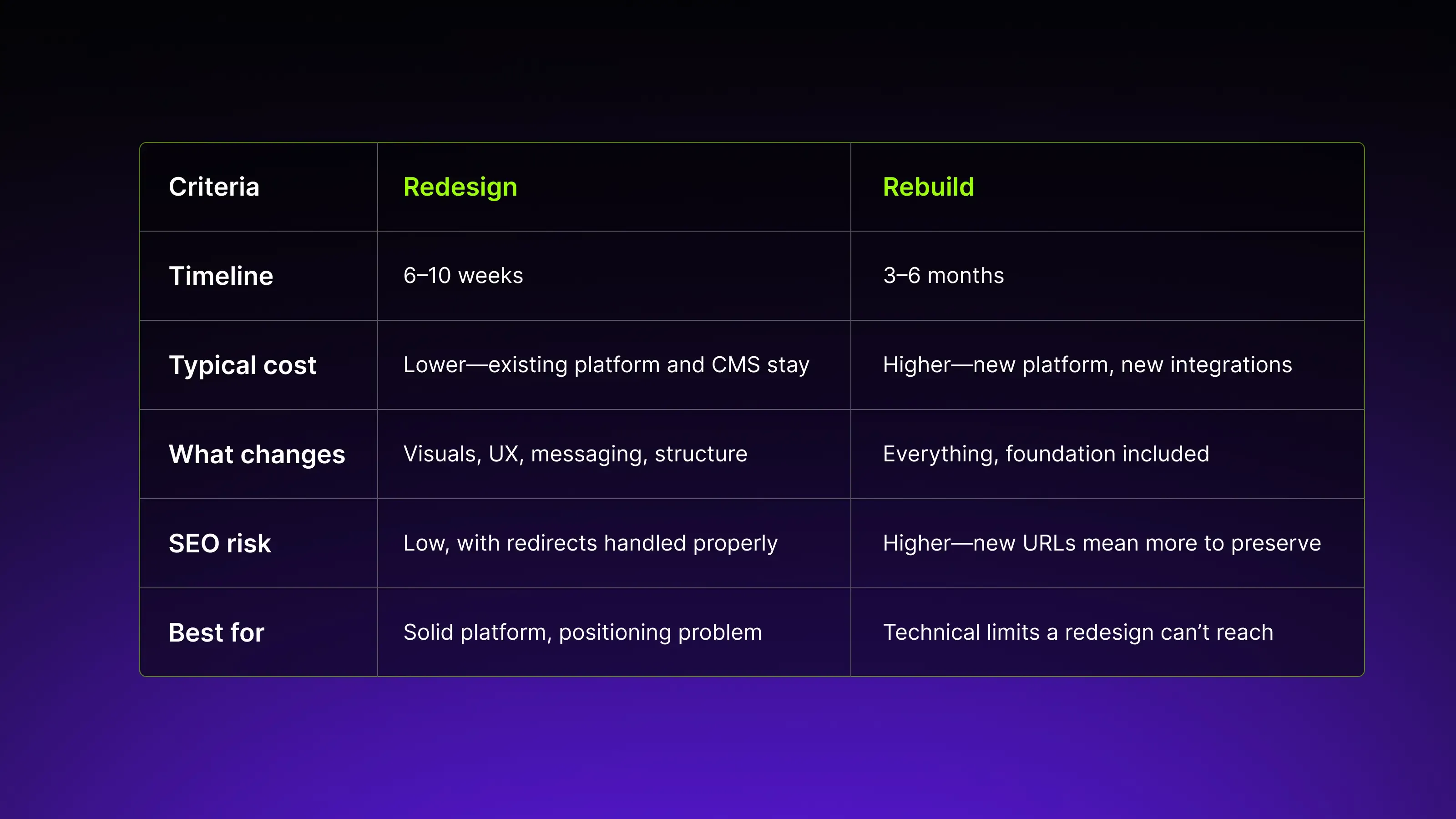
A redesign changes what sits on top of your existing foundation, while a rebuild replaces the foundation itself. The two get used interchangeably, yet they cost very different amounts.
Redesign
Timeline: 6–10 weeks from kickoff to launch.
Cost: Lower—the existing platform and CMS stay in place, so you’re changing what sits on top, not what’s underneath.
What changes: Visuals, UX, messaging, and structure. The technical foundation stays intact.
SEO risk: Low, when redirects are handled properly.
Best for: Sites with a solid technical foundation where the problem lives in positioning, messaging, or UX.
Rebuild
- Timeline: 3–6 months, depending on platform complexity and the number of integrations involved.
- Cost: Higher—requires a new platform, new integrations, and the full migration work that comes with them.
- What changes: Everything, including the foundation itself.
- SEO risk: Higher, because new URLs and a new architecture mean more ranking signals to preserve and transfer.
- Best for: Sites where technical limits are holding the business back—a discontinued CMS, missing functionality, or an architecture that can no longer support what the business needs.
When your CMS works, and the site says the wrong thing slowly, redesign. Rebuild when the foundation itself blocks you: a discontinued CMS, no room for the functionality you now need, an architecture that fights your content. Budget for the longer runway in that case.
Not sure which one fits?
Сhoosing the right level of change gets easier when you can see how other companies approached the same decision.
The website redesign process that drives leads
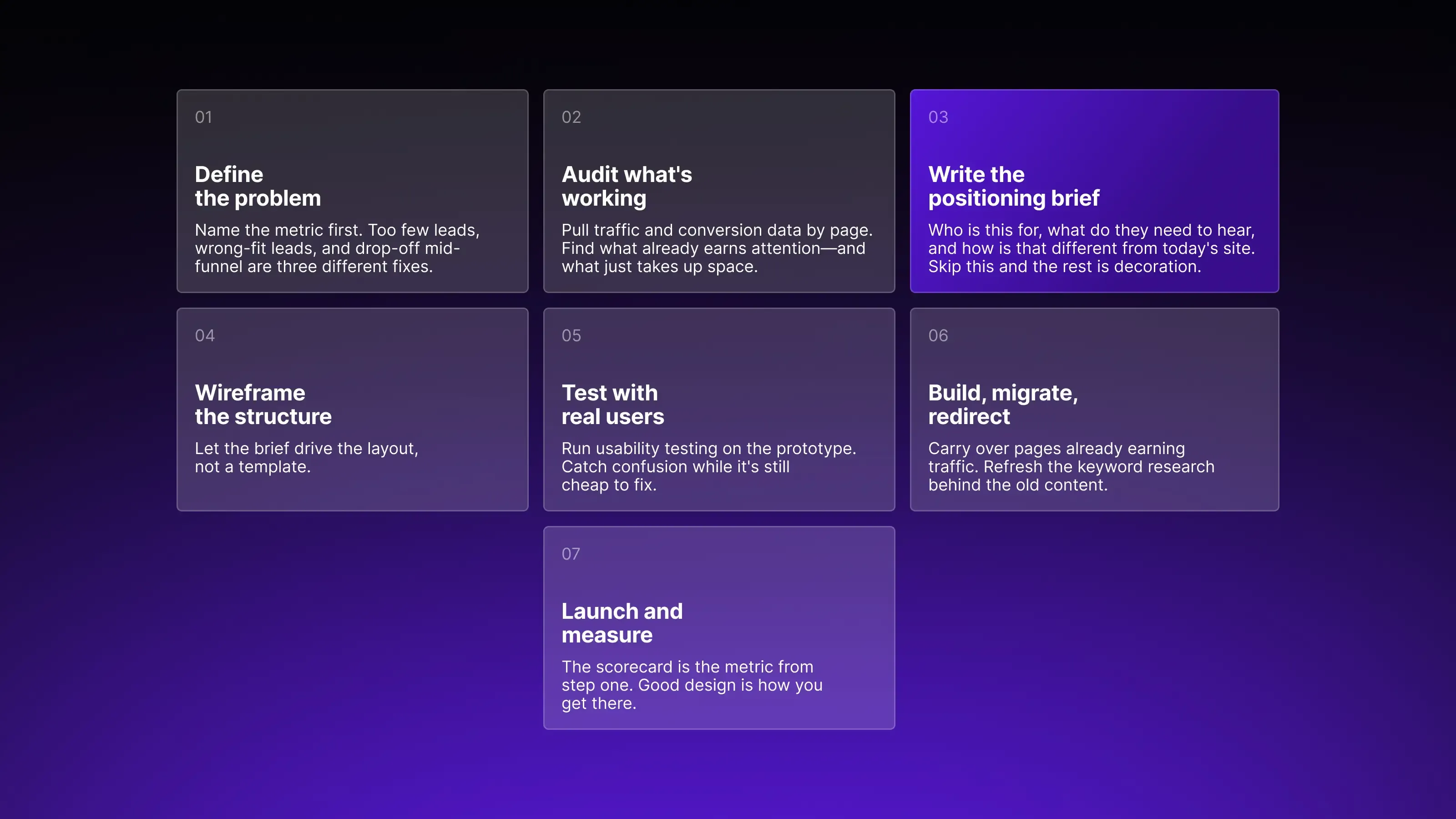
Seven steps, and each one moves something you actually care about: traffic, conversions, or the quality of leads coming in. Not phases to get through—outcomes to get to.
01. Business problem definition. Deciding how deep you're willing to go—surface-level or structural—shapes what kind of impact on conversions you can realistically expect.
02. Performance and competitive audit. Pull traffic, conversion, and bounce data by page to find which pages are already crushing it—and which just take up space. Then study how competitors who repositioned are winning attention.
03. Positioning brief. A document that defines who the site is for, what they need to hear, and how that differs from today's message. Skip this step and the rest becomes decoration.
04. Wireframing and prototyping. Positioning moves from theory into actual page structure here—where the logic of the brief gets tested against layout decisions.
05. Usability testing on the prototype. Actual users test every function that needs to work on the new design, so issues surface before anything goes live.
06. Build, migration, and redirects. Carry over the pages already earning traffic, and refresh the keyword research behind the old content.
07. Launch and measurement. The scorecard is the metric you named, and good looks are simply how you get there.
Each step carries weight in both directions—following it and skipping it. Picking the steps that feel comfortable and skipping the ones that don't is how a redesign ends up looking great and converting the same.
PMI’s 2024 Pulse of the Profession found that 30% of projects across organizations experience scope creep on average—ranging from 23% in top-performing teams to 37% in the rest. And a written brief from step one is the cheapest way to land in the lower number.
Web design best practices that move conversion
Good UX doesn't make people fall in love with your site, but it keeps them on the path to what they came for. Six decisions that make the difference:
- Simplicity. Cut anything on the page that fails to move a visitor toward the next step, because clutter reads as uncertainty—and B2B buyers read uncertainty as risk.
- Obvious navigation. When pricing or contact takes more than two clicks, interested people leave before they act on that interest.
- Load speed. Nobody likes waiting around for a site to load—if it’s dragging, people will bounce. A fast site keeps things smooth and gets visitors to your offer without the unnecessary friction.
- Mobile-first design. A meaningful share of B2B research happens on a phone, so the mobile version needs the same design attention and testing as desktop—not a scaled-down copy of it.
- Accessibility. The 2026 WebAIM Million report found 95.9% of the top one million home pages carry detected WCAG failures. Screen-reader and keyboard support therefore put you in a small group, and enterprise procurement notices.
- Scannable content. B2B buyers scan a page before deciding whether it's worth reading in full. Short paragraphs, real subheadings, and purposeful bullets are what get a page past that first scan.
The first three decisions clear obstacles out of the visitor's way. The last three make sure the experience works for everyone who arrives. Get these six points right and most of the UX value a redesign can deliver is already there.
How much does a website redesign cost?
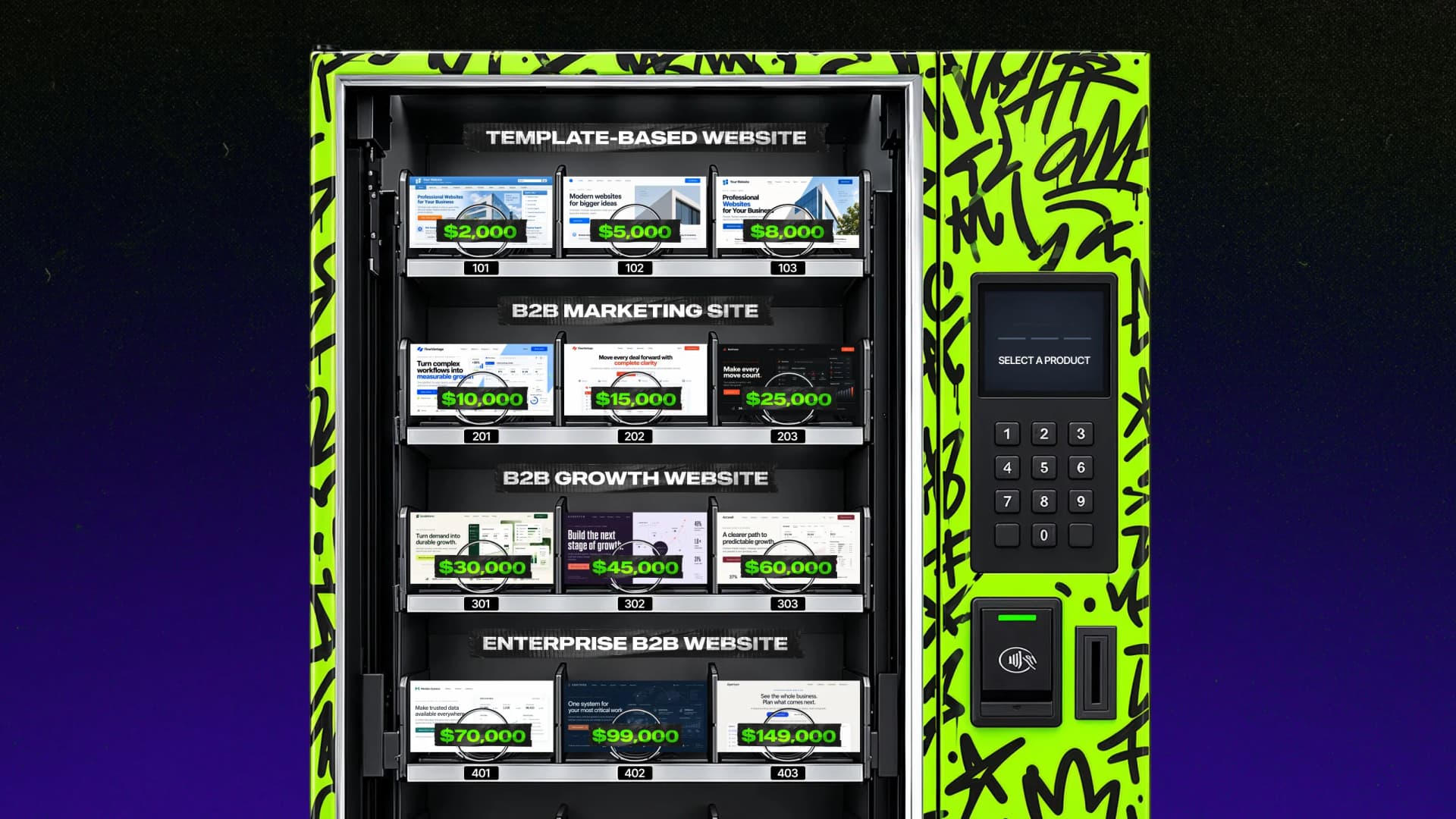
Pricing is hard to compare because agencies scope differently. Two proposals for the same site can differ by $50K, and the gap usually comes down to how much of the site's logic gets rethought. Roughly how that breaks down:
Refresh—$15K+
Updated visuals and copy on your current CMS. The right call when the message still works.
Mid-scope redesign—$30K+
Custom design on your platform, some UX and content rework.
Repositioning + redesign—$70K+
New messaging and brand direction, custom UX, content rebuilt around a sharper offer.
Enterprise or complex—$100K+
Multiple stakeholders, integrations, and migration off a legacy platform.

Whatever the tier, the same cost categories apply: design and development time, content, testing and QA, SEO and marketing setup, hosting and maintenance. But one line item goes missing from some budgets: a contingency for changes that surface mid-project. Every tier needs it, and the projects that skip it are the ones where fixed-price turns into a negotiation.
A $5K template swap on a site with a positioning problem just gets spent again next year, against the same conversion numbers. Spend enough to fix the actual problem.
Budget conversations go better with a scope attached
Walk us through your goals and get back a breakdown of what each tier actually buys: timeline, deliverables, and where the money goes. You'll have real numbers to take to your own budget conversation.

Don’t lose your rankings: preserve SEO equity in a redesign
A redesign can undo years of search visibility when SEO arrives as a launch-day afterthought. Luckily, the fix is mechanical.
Before anything else changes, pull every URL currently earning organic traffic or backlinks, ranked by traffic. A 301 redirect is a permanent-move instruction that tells Google, and anyone holding an old link, exactly where that content now lives. Every one of those URLs needs one, pointing to its closest equivalent on the new site.
Then keep the content that already ranks, even when the voice needs an update. While migrating, carry image alt text and meta titles across rather than leaving them blank on the new build. And test every redirect after launch, because a redirect that lands on a 404 does more damage than no redirect at all.
Qream’s team has run this checklist on both sides: client migrations and our own blog, where every article older than three years goes through the same redirect-and-replace process. Building the redirect map during planning rather than treating it as a post-launch task is what keeps the SEO equity intact. That’s the difference between a redesign that keeps compounding and one that resets your search visibility to zero.
A website redesign that lifted leads
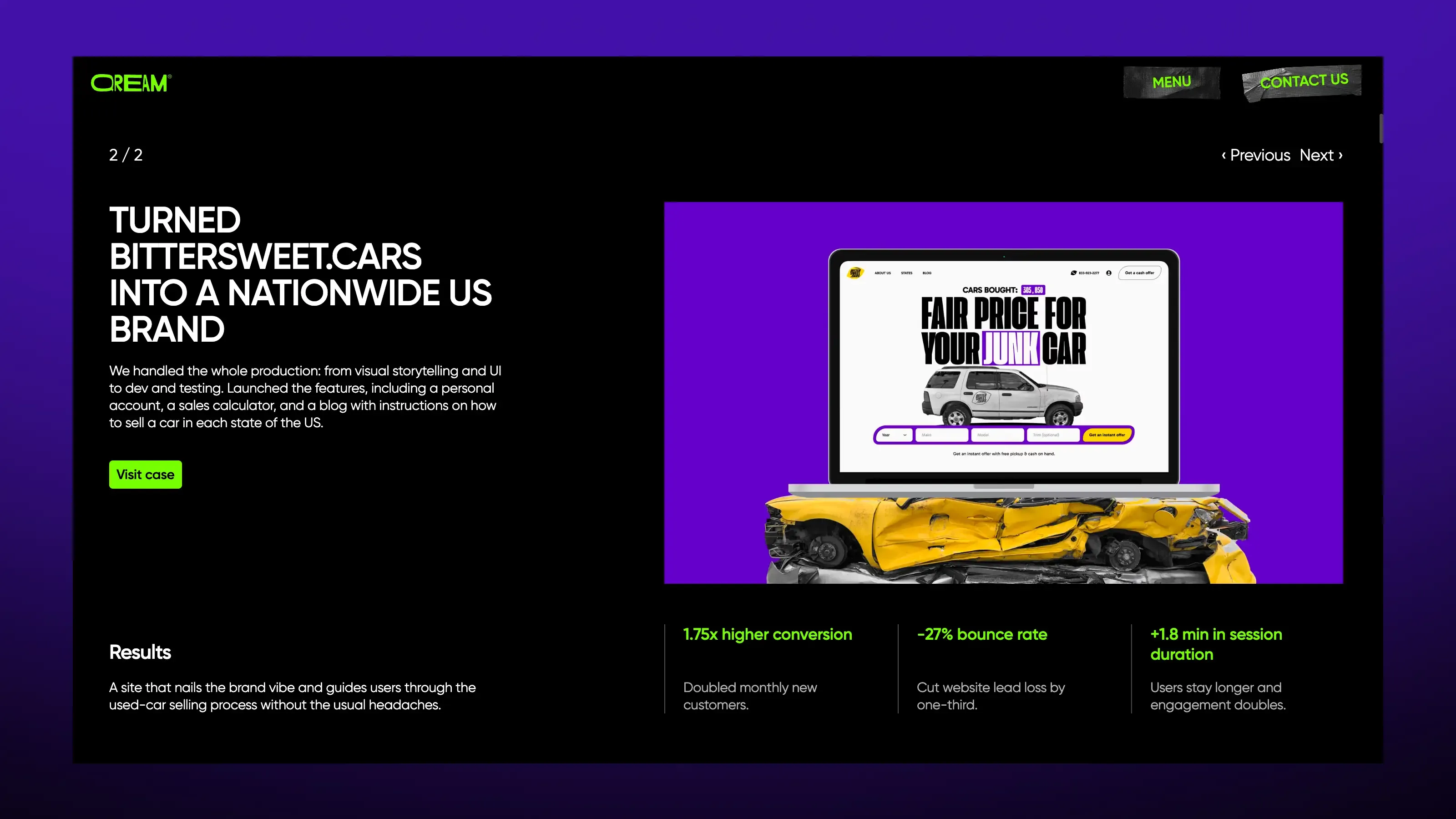
Bittersweet.cars came in as a brand lost in a sea of soundalike competitors. The goal was to turn a car sale into something people actually remember.
The work covered the full production: visual storytelling, UI, development, and testing. Two site variants went live to test what actually drives clicks and conversions, alongside a quiz-style car sale calculator built for real usability.
The results: 1.75x higher conversion rate, a 27% drop in bounce rate, and users spending 1.8 minutes longer on the site per session.
That same pattern repeats across brand transformation work for B2B and enterprise technology companies: real visual craft, aimed at a credibility problem.
Your business has more potential than your site currently shows?
Every site needs its own approach to attracting leads—and it's worth understanding the options.
FAQ
A typical B2B redesign runs 6–10 weeks from kickoff to launch, while a full rebuild runs 3–6 months. Timelines depend as much on decision-making speed as on the design work itself, so aligning stakeholders early and having content ready keeps projects on track.
Costs run from around $15K for a mid-scope redesign to $150K and up for a full repositioning, depending on how much messaging changes alongside the visuals. Scope drives the number more than page count does. A redesign on your existing platform sits at the lower end, while new messaging, custom integrations, large content migrations, and extra revision rounds each push a project toward the top of its range. Deciding the depth upfront is what keeps the estimate stable.
No, as long as it’s handled properly. Set up 301 redirects for every indexed page, keep your top-performing content, and test every redirect after launch. Rankings drop when redirects get skipped or delayed. The redesign itself carries no penalty.
Choose a redesign when your current platform works and the problem lives in visuals, UX, or positioning. Choose a rebuild when the technical foundation can’t support what you need anymore—a discontinued CMS or an architecture that fights your content are the two clearest signals.
It should cover the business problem, a performance audit, the positioning brief, wireframes, usability testing, the build with redirects, and post-launch measurement. Together, those seven cover the work that decides whether leads actually move.
Written by

Qream co-founder | Design and product direction
Leads Qream's creative and product direction, connecting brand strategy, experience design, and business goals. Reviews content where design strategy, UX/UI, customer experience, and brand execution are central.